
By Martin Jansen, Owner of Jansen-PCINFO
Regardless of operating system there are common computing skills that apply to all users.
File Management
You are in a group and you receive documents for meetings and announcements. What do you do with the files? Many people just download the files to the Downloads folder on their computer. Others save them to their Desktop* – please don’t do that! But before you can deal with the files you need your browser to cooperate.
Most internet browsers are set to automatically download files to the Downloads folder. Go into Settings, Downloads and turn on “Ask where to save each file before downloading.”
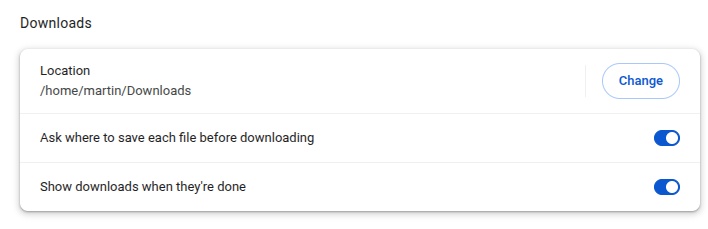
Now you will be prompted where to save files in email attachments. *When I write that you shouldn’t save documents to the desktop, it slows the loading of the operating system as all the files need to load with the desktop.
The most obvious place to download documents is the Documents folder with subdirectories for subjects and years. For instance, if I were working with my finances and have statements from the bank to download, I would use a directory structure like this:
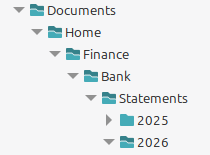
This sort of structure also helps with backups of the most important data.
Internet Browsing and Apps
There really is no difference between operating systems when running popular internet browsers. Chrome, Firefox, Brave, Edge and Vivaldi are all cross platform. Safari is the default for Apple products, while Edge keeps being the default with every update on Windows.
And many Apps are nothing more than specific links to websites. There is “an app for that” for every conceivable purpose, but quality varies greatly as reflected in the reviews.
Please don’t get me started on excessive advertising in Apps.
One of the most important uses of a computer is daily commerce which keeps our country running. If a store does not have a successful online presence that store is likely to fail.
Online Apps are surpassing traditional installed Apps for ease of use and access. Google Workspace offers a suite of online applications while Microsoft has online apps for many of their products, but these are less powerful by design. Microsoft still sells their personal suite of productivity apps for $100 per year.
For software developers it makes sense to use online apps because you make programming changes and upgrades at the source, not having to send updates as packages for download and installation.
Local Apps
While online apps are good and can be full featured, local apps give the user the freedom of working offline. Many of these apps are open source and can be used for free – that’s a price I can afford. LibreOffice is a good example of free and usable software where you actually need to save documents. LibreOffice comes installed in many Linux distributions, but can be downloaded and installed on Windows and macOS (including the newer ARM64 based) computers.
I wrote another article discussing open source software, follow this link.
Games
Many people spend a lot of time and money on computer based games. While I am not a gamer, I can appreciate the lengths people will go to create the ‘perfect system.’ It starts with a high end processor (CPU) and adds an expensive Graphics Processing Unit (GPU). The average cost of a gaming PC starts at around $1,000 and can go as high as $35,000:
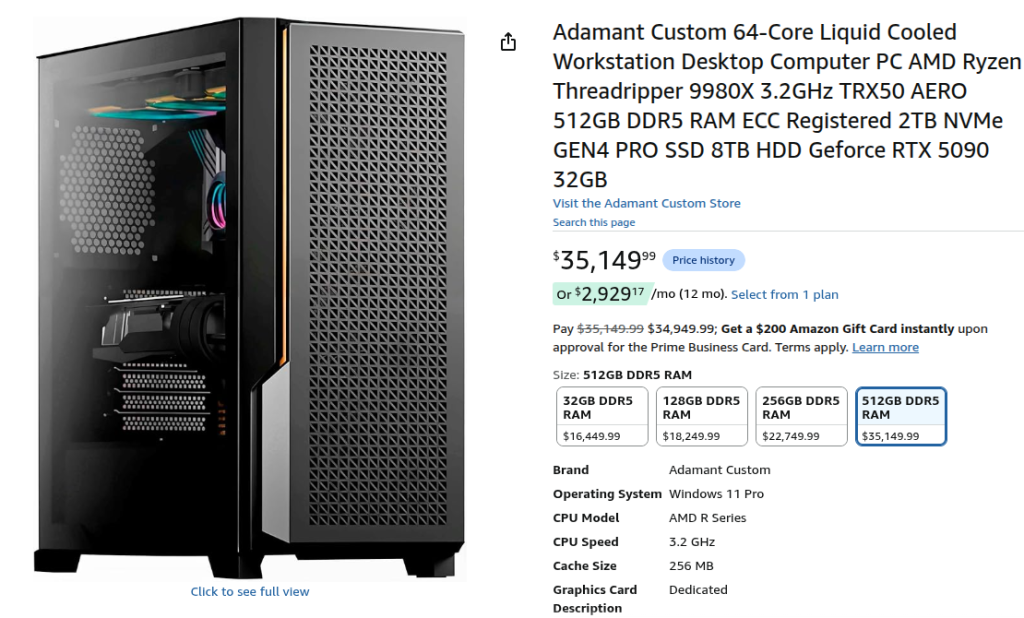
This price reflects the RAM shortage (called RAMageddon) we are experiencing today.
Gaming computers used to be a Windows only venture, but Linux in the last few years has become a great gaming platform. This article covers different distributions that focus on gaming: https://www.rankred.com/linux-distributions-for-gaming/
Other Office Tasks
Scanning and printing (the usual for a home office) were usually done in Windows, but macOS and Linux can do these functions as well. Thanks to tools like Hamrick’s VueScan even older printers/scanners can be used for archived documents.
Our home has reduced several file cabinets of old paperwork to one small cabinet that also serves as a printer stand. Our older Brother QL-720NW label printer, older Brother MFC-J835DW all-in-one and newer Brother HL-L2460DW two-sided laser printer are all wired to our network. This, in my opinion, is much more reliable than WIFI connections. We even have a Fujitsu fi-5120C two-sided scanner that we purchased on eBay several years ago. Fujitsu no longer supplies drivers for this model, but VueScan works perfectly on the USB connection to my Linux Mint Cinnamon 22.3 computer.
Conclusion
Many years ago I switched to Linux Mint as my primary operating system. My wife followed a few years ago. We have found that the OS doesn’t make much difference when it comes to getting things done. Just about everything we could do in Windows can be done in Linux Mint, but we don’t have to deal with artificial intelligence Copilot or any other difficulties associated with Microsoft products.
Linux Mint provides us with a stable and reliable environment for practical computing.