
By Martin Jansen, Owner of Jansen-PCINFO
Back in November of 2022, I was looking for a laptop or Chromebook for personal use. Lenovo had an incredible deal on a ThinkPad C13 Yoga Chromebook (13”) – Abyss Blue. A coupon brought the price down to $160 with tax. That price seems impossible today with electronic prices creeping higher and higher, especially RAM and Storage.
I used this Chromebook for the past 4 years without issue. The computer has some great hardware: A 2K touch screen, backlit keyboard and inputs – it has a touchpad, thinkpad pointer and pen. It also has a 65 watt usb-c power port, another usb-c port and two usb-a 3.0 ports. The computer has a micro sd slot for additional storage.
Two weak points on this computer: the processor is an AMD Athlon Gold with only 32 GB of onboard storage.
chromeOS
Still this computer ran the chrome operating system perfectly and received regular updates from Google. ChromeOS is a barebones operating system primarily designed to run the Chrome Browser. Additionally the OS can support many Google Apps, and it can run an older version of Debian Linux. But Debian is run in a container and takes up additional space.
Google apps are, of course, designed to run on an android phone, not really the big 13 inch screen of this Chromebook.
Capacity Anxiety
With only 32GB eMMC storage, I had to keep examining my capacity to make sure I did not use too much. I was limited in how many apps I could install and the contained linux did not run well – even a simple solitaire game.
Google Security
I understand that security is important and Google is at the forefront of making Chromebooks secure. I used to be able to run an older version of Ubuntu in a chroot on the Chromebook, but Google took away SU privileges in the name of security. In short, I again felt limited by Google.
Conversion
So, what was I to do? ChromeOS was running well, but I felt limited. I enjoyed the freedom of my Linux Mint computers where the only limits are my imagination. And there are other Linux distributions that are very capable of providing freedom as well.
mrchromebox.tech
Early in writing these blogs, back in November of 2019, I wrote an article entitled My $75 Laptop. The article discussed the steps of converting an Acer C740 Chromebook into a PC. Amazingly, that same laptop is still working today and running Linux Mint without issue.
I once again turned to mrchromebox.tech to see if my Lenovo was eligible for conversion. Sure enough it was listed as:
| AMD Picasso | |||||||
| Device Name | HWID/Board Name | RW_LEGACYFirmware | UEFI Firmware(Full ROM) | WP Method | |||
| Lenovo ThinkPad C13 Yoga Chromebook | MORPHIUS | ✅ | ✅ | CR50 (SuzyQ, battery) | |||
The WP Method, however, is quite different from the older Chromebooks, where you just removed a screw.
Now I was seriously thinking about converting my Chromebook to a PC, but this is not a step to take lightly. First of all, this is definitely not supported by Google and, if steps are not followed exactly, you could possibly ‘brick’ your hardware. That is, making the Chromebook into a door stop and not much else.
Do It!
OK, after comparing the positives versus negatives, I committed to make the conversion. First I watched several YouTube videos concerning the CR50 process to overwrite the firmware and open the chromebook to different operating systems. I had purchased a SuzyQ adapter a few months ago when I first entertained the idea of possibly converting the Chromebook – it looks like this:
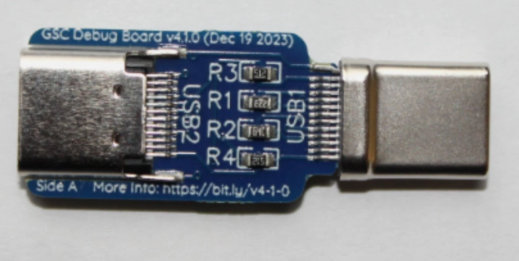
Just the adapter which costs about $8. I had plenty of USB cables. The advantage of using the SuzyQ and cable is that you don’t need to open the case, the disadvantage is that there are many more steps that could possibly go wrong.
I wrote a document outlining all the steps:
Step1
- Shutdown the Chromebook and remove the SD card.
- Put the Chromebook in Developer Mode (Wipes all data)
- Log in as root and clear all flags using gsctool commands (takes about 5 minutes)
Step 2
- Reboot and reenter Developer Mode
- Attach SuzyQ adapter and cable testing USBtty connections (adjust USB ports used as needed)
- Clear WP (Write Protect) using three commands
- Verify with gsctool -a -I command.
Step 3
- Reboot and reenter Developer Mode
- Connect to WIFI
- Login as chronos
- Run command: cd; curl -LOf https://mrchromebox.tech/firmware-util.sh && sudo bash firmware-util.sh
The last bulleted item actually installed the firmware and new BIOS to boot the computer.
I must have done it correctly, or else the menu of options would not appear. I selected 2 to install the seaBIOS firmware. Once completed, the seaBIOS replaces the chromeOS firmware.
Which OS?
I researched operating systems for storage use. I wanted an OS that would only use about 10 to 15GB. Linux Mint XFCE edition is very lightweight. Zorin OS Core would also be about the right size. There are others: Puppy Linux, Lubuntu, antiX all might work.
First, I tried Linux Mint XFCE. The installation is familar:
- On another computer, download the ISO from the website
- Write the ISO to a USB stick
- On the Chromebook insert the USB stick
- Press the Esc key when the seaBIOS rabbit appears
- Select booting from the USB stick
- Try the OS to see any obvious compatibility issues – video or WIFI issues for instance.
- Click on the Install icon on the desktop and follow the directions.
At first I tried Linux Mint XFCE, but that distro had problems with the 2K touch screen. The text was tiny and increasing sizes lead to uneven results. Next up is Zorin OS Core.
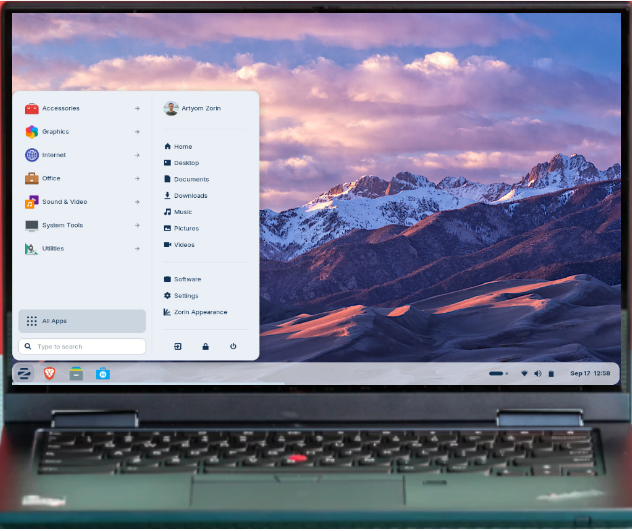
Zorin booted up beautifully in Live Mode, displayed properly and the WIFI worked. I installed the OS following the directions as on all Ubuntu based distributions. So, for now, I am using Zorin as the OS on my new (to me) converted Chromebook.
Conclusion
Zorin OS Core is working very well. Boot up times are respectable and every day use is great. Zorin looks really good as well – it’s a modern desktop. There are some delays when launching YouTube videos – the bottleneck is probably the processor. I installed Chrome Browser and am using my Chromebook, converted laptop to finish this article.