

By Martin Jansen, Owner Jansen-PCINFO
Problem:
A long time customer came to me with a strange problem with her desktop computer. She would turn it on in the morning and it would come up to the Windows 11 desktop without issue. Pretty fast, too, due to the 9th Gen i7 Intel processor, solid state drive and 16 GB of RAM.
Then she would come back to the PC later in the day and the monitor would be blank. If she wiggled the mouse or pressed a key on the keyboard, which was supposed to wake the PC and monitor, nothing would happen.
She would have to press the power button for a few seconds, the PC would turn off and then she could restart the PC and it would come up to the desktop.
Possibilities:
Many reasons could exist for this problem. It could be the monitor, but that was unlikely due to the immediate response when booting and rebooting. Another unlikely candidate, the display adapter on the motherboard of the computer. Again discarded for the immediate response when booting up. She did have a display adapter which converted the displayport output of the PC to VGA on the monitor. No HDMI out on this PC.
The monitor could handle VGA as well as HDMI inputs.
Testing:
To thoroughly eliminate the monitor as the problem, I suggested that I pick it up and run it through some tests. I set the test computer to never blank out the screen and ran it through some tests at https://www.eizo.be/monitor-test/. The monitor never faltered the whole day.
I called the customer to share the results of the testing.
The next step was to pick up the PC and run some tests. As before the desktop came up as usual and ran perfectly. I set her PC to never blank the screen or sleep and ran the same monitor tests, focusing on the Response Time test.
I left the computer alone for an hour or so and came back. It was OK and responded to mouse clicks and keyboard entries.
Then I left the PC alone for several hours. When I returned the Response Time test was stuck on the screen. Windows 11 had locked up. The only choice was to power off the PC and restart.
This happened several more times.
A little research into the phenomenon revealed that maybe the power mode was this issue. I switched power modes from Balanced (the default) to Best Power Efficiency.
Windows Fix Thyself
Upon restart after a lockup, Windows did the strangest thing, it went into a Repair Session. It took a long time. The temptation was to interrupt and reboot, but experience told me to hold off and let Windows do its thing.
When I returned to the PC it took a little longer to come up to the desktop, but then the system was stable. No more lockups.
Return of the PC
I returned the PC and hooked it up to all peripherals, including the monitor with the DisplayPort to VGA adapter cable. It was only then that I noticed that the DP connector was a little loose in the socket. Nonetheless, the computer booted up well and I thought the problem had been fixed. But the customer called back saying the monitor was blank again.
Adapter Replacement
This time I replaced the adapter cable with a DisplayPort to HDMI Adapter and decent HDMI cable.
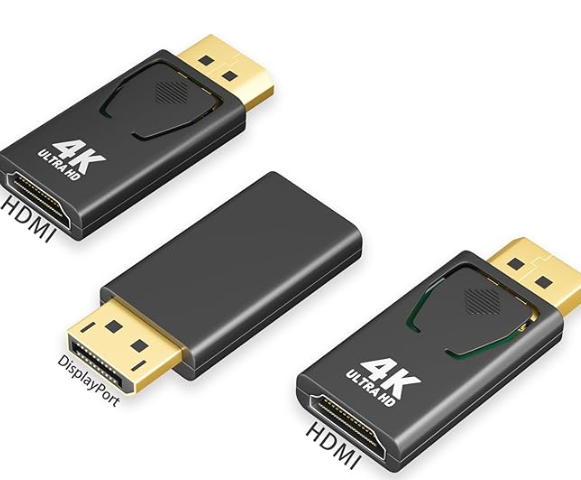
This combination worked perfectly and her PC is working as it did before without issue.
Conclusion
In the end, it was a combination of an unstable Windows operating system and a loose DisplayPort socket that caused my customer’s computer woes. On to the next computer problem.